Editor score 4.2 / 5
Introduction
If you're organizing montblanc products, the real challenge isn't copying every link into a spreadsheet—it's determining whether each row corresponds to the correct product, whether the image belongs to that product, whether the page still opens, and which records can be further verified. fashion-reps is great for browsing catalogs and viewing product cards, while Google Sheets excels at bulk filtering, adding notes, and collaborating on review. Using them together reduces redundant clicks, mismatched images, and treating outdated info as current fact.
This article focuses on a specific task: finding records from the Montblanc catalog on fashion-reps that need further verification, and labeling product name, page status, image status, and update time in Google Sheets. We won't treat catalog listings as proof of inventory, authenticity, quality, or purchase availability, nor expand a perfume sample into the entire Montblanc accessories line.
User's Filtering and Verification Goals
Before starting, break the goal into actionable steps:
- Go to the Montblanc-related catalog on fashion-reps, and confirm product name, category, and whether product cards are visible.
- For each candidate record, keep page source, current visible image, and date the page was viewed.
- Use keywords, category, and status filters in Google Sheets to distinguish between "needs verification," "insufficient evidence," and "can continue viewing."
- Open pages one by one to confirm product links don't redirect to blank pages, error pages, or unrelated products.
- Check image correspondence to avoid mistaking category page covers, adjacent product images, or old screenshots for current product evidence.
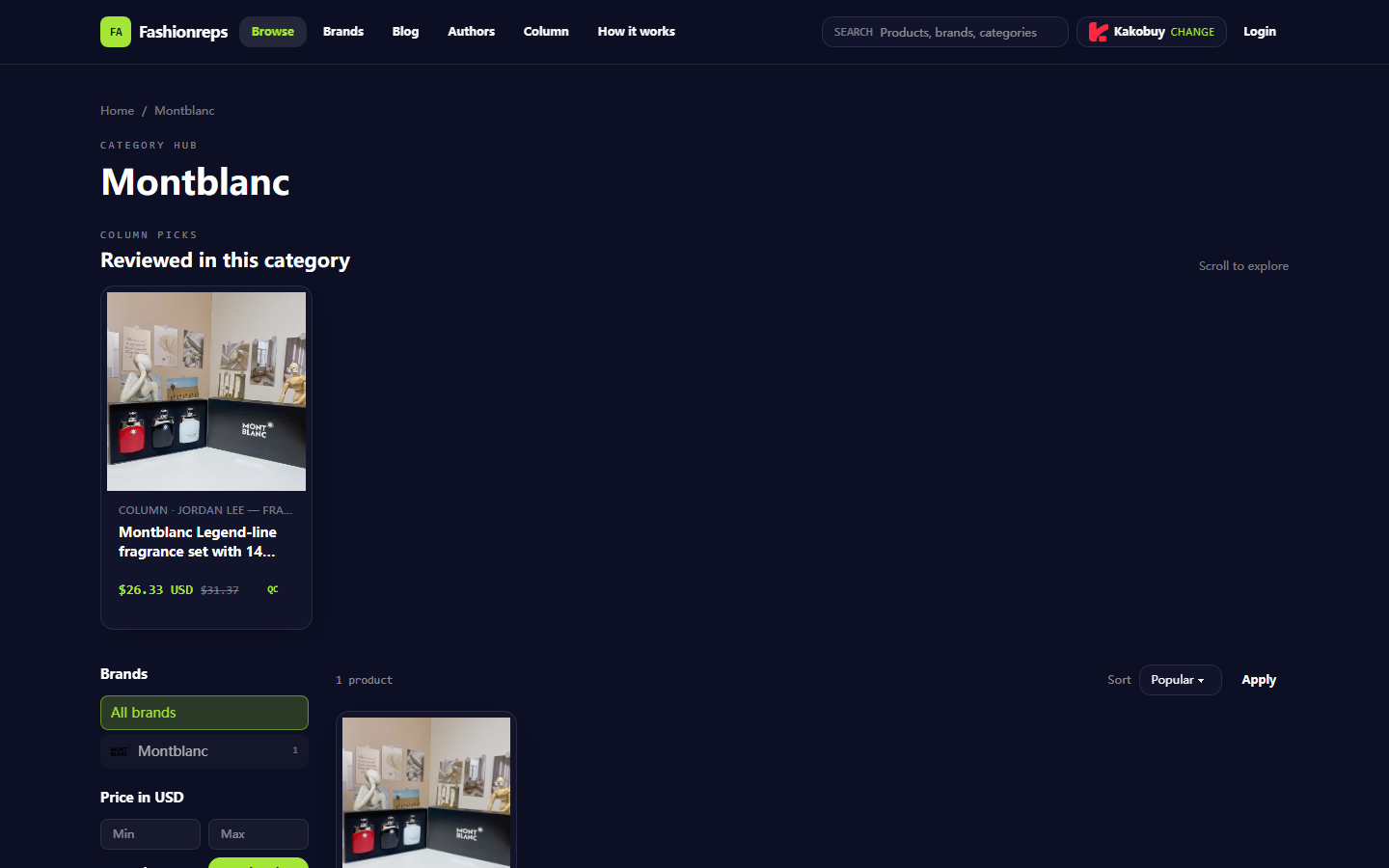
The current verifiable page sample shows that fashion-reps' Montblanc category page can be entered through the brand directory, displaying a Montblanc product card. The card is described as a Legend series fragrance set with 14 size variants, labeled capacity range 90–125 ml, showing a reference price of 26.33 USD and a previous reference price of 31.37 USD. This sample illustrates how catalog fields are read but does not prove Montblanc accessories, inventory, seller, quality, or final transaction price.
Therefore, in the spreadsheet, distinguish between "catalog record seen" and "product verification completed." 👀
Browsing Steps for montblanc Accessories in fashionreps Catalog
First Confirm the Catalog Hierarchy
When entering fashion-reps, prioritize using brand or category entry points rather than relying on search engine results. A catalog page typically shows navigation, category name, editorial or section hints, product cards, and filter controls simultaneously. First confirm the current page indeed belongs to Montblanc, then read the product card content.
When browsing, record in this order:
- Category of the page, e.g., fragrance, accessories, or other product type.
- Product name and brief description shown on the card.
- Visible specifications, capacity, or variant count.
- Reference price and its currency.
- Whether the page shows images or a QC entry.
- Whether the product card provides an action to enter the detail page.
Don't automatically classify a perfume page as accessories just because the brand name matches. If the page category doesn't match your target, mark it as "category pending confirmation" in the spreadsheet instead of rewriting the title to fix it.
Narrow Down with Filter Controls
If the category page provides brand, price, or sorting controls, you can first select Montblanc and then check the result count. Price filtering only helps narrow browsing, not substitute for product authenticity or final price verification. Sorting changes display order but does not imply recommendation.
In the current sample, the Montblanc category page shows 1 product result. This count only represents the number of visible results retrieved at that time; it cannot infer there are no other Montblanc products on the platform, nor can it infer stock stability. 📌
Read Product Cards, Not Just Covers
Product name, specifications, and reference price on the card should be recorded separately. Do not interpret text, brand logos, or packaging appearance in an image directly as material, origin, authenticity, or quality conclusions.
If the card only provides a generalized description, keep the status "detail page evidence needed" in the spreadsheet. For accessories, additionally confirm that color, size, material, style, and variant information clearly appear on the page. The current sample does not provide these fields for general Montblanc accessories, so do not add them.
Keyword, Filter, and Notes Columns in Google Sheets
Google Sheets' role is to turn scattered browsing results into reviewable records. Start with a base table of one product per row, not multiple products and links crammed into a single cell.
Use the following columns:
| Field | Purpose | Recommended input |
|---|---|---|
| Product Name | Compare with catalog and detail page | Keep original page text; optionally set a standardized name |
| Target Category | Distinguish accessories, fragrances, and other categories | Use fixed options to avoid synonym mixing |
| Catalog Source | Record where the product was found | Enter internal path or system-generated source field |
| Page Status | Determine if further opening is needed | Options: pending verification, accessible, blank page, redirect anomaly, category mismatch |
| Image Status | Check if image corresponds to product | Options: matched, pending confirmation, missing image, suspected old image |
| Reference Price | Save page's current displayed info | Include currency and verification date |
| Verification Date | Prevent old facts from being treated as current | Use consistent date format |
| Notes | Record gaps and next steps | Only write executable follow-up actions |
Keyword Setup
Keywords should center on the user's task, not just the brand name. Set up these filter groups:
- Brand words: montblanc, Montblanc.
- Category words: accessory, accessories, wallet, belt, jewelry, etc., only when the page indeed shows corresponding categories.
- Evidence words: image, photo, QC, variant, size, material.
- Status words: pending verification, category pending confirmation, image pending confirmation, link anomaly.
If the spreadsheet contains both English and Chinese descriptions, don't rely on a single search term to judge a match. English pages may use brand and specific category names, while Chinese notes may use internal statuses like "accessory pending confirmation." 🔎
Setting Filters and Note Rules
First filter by "Target Category," then by "Page Status" and "Image Status." This helps exclude obvious category mismatches first, then handle link and image issues.
Notes should answer three questions:
- What has been confirmed about this record?
- What evidence is missing?
- Which page to open next or which field to re-examine?
For example, "Montblanc category page visible, current card described as fragrance set, insufficient to prove accessories, need to confirm detail page category" is more useful than "looks good." The former guides the next review, the latter cannot produce action.
Comparing Image Info Between Product Cards and Spreadsheet Rows
Image verification should complete at least three correspondences: name, page position, and image purpose. A catalog cover image only proves visual material exists on the page; it cannot independently prove a specific variant, color, or size.
Follow this checking order:
- Open the product card and confirm the image is within that product's area.
- Compare the product name and description next to the image to avoid adjacent card images.
- Check if the image matches the detail page or QC entry.
- Record image status in Google Sheets, not just paste the image URL.
- Mark images whose source or time cannot be determined as pending confirmation; do not label them as real shots, unboxing, or quality evidence.
If the image is from a category page screenshot, describe its use as "catalog display image" or a similarly accurate term. Avoid wording that implies physical verification, such as "verified," "real on-body," or "material clearly visible," unless the page has explicit, verifiable evidence.
When an image is missing, leave the cell empty and note the gap rather than substituting adjacent products, search results, or unknown sources. For accessories, pay special attention to whether details like color, clasp, engraving, and size actually appear in the current product image.
How to Review Link Opening, Source, and Update Time
Link review focuses on confirming the page still points to the original record, not just checking if the link text exists. When opening one by one, record the following results:
| Review Item | Pass Condition | Record When Failing |
|---|---|---|
| Page Accessible | Page loads normally with clear product content | Blank page, error page, or access failure |
| Product Match | Page name corresponds to spreadsheet row | Redirects to another brand or category |
| Image Match | Image belongs to current product or page purpose clear | Image source unknown or mismatched |
| Price Info | Currency, amount, and page date clear | Amount missing unit or unreadable |
| Source Traceable | Can return to catalog or detail page | Only forwarded address or screenshot without context |
Prices, inventory, specifications, seller, shipping, taxes, and return policies may change. Reference prices in the spreadsheet must be in the same row as the verification date; never keep a number without a timestamp. The current sample shows the page's reference price, not the checkout price or total cost including shipping and taxes.
If a page redirects, record the actual content after redirect first, then decide whether it still belongs to the same product. If uncertain, set status to "link pending review." Do not delete original records or overwrite old addresses just to make the spreadsheet look complete. 🧾
Boundaries Between Mobile Quick Browsing and Desktop Deep Organization
Mobile is suitable for quick discovery and initial marking:
- Enter Montblanc category page.
- View product name, category, and first image.
- Mark page accessibility.
- Record rows that need to return to desktop for further verification.
Desktop is better for structured organization:
- Open catalog page, product detail page, and Google Sheets simultaneously.
- Compare multiple columns and multiple images.
- Use filters to check category, link, and image status.
- Add verification date, price currency, and next-step notes.
- Handle duplicate records, abnormal redirects, and evidence gaps.
Quick browsing results on mobile should not be directly considered final, especially when pages have many fields, images need zooming, or links need comparison. Desktop organization also doesn't mean purchase verification is complete; it just makes evidence and gaps easier to review.
Combined Workflow of Website Catalog and Google Sheets
Adopt a cycle of "catalog discovery, spreadsheet organization, page review, status write-back":
- Discover Montblanc records in fashion-reps catalog.
- Write product name, category, page status, and image status into Google Sheets.
- Use filters to identify items with category pending confirmation, image pending confirmation, and link anomalies.
- Return to catalog or detail page to verify one by one.
- Write review results, reference price, currency, and date back into the same row.
- Keep records that cannot be confirmed and note the next action.
The spreadsheet is not a replacement for the catalog, and the catalog is not a structured database. The catalog provides current visible page context, while the spreadsheet stores your judgments and review trail. The most important linking fields between the two should be product name, source location, and verification date.
For multi-person collaboration, it's recommended to allow only fixed status values and put free text in the notes column. This avoids the same issue being recorded as "missing image," "no image," "pending image" and other statuses that cannot be filtered uniformly.
Do not misinterpret "can continue verification" in the spreadsheet as "worth buying." It only means the current record still has enough clues to open the page and continue checking. Whether to purchase requires independent verification of price, specifications, seller, payment, logistics, customs, and after-sales conditions.
Final Actions: Marking "Can Continue Verification" and "Pending Evidence" Items
After a round of organization, divide records into three categories:
Can Continue Verification
Product name and category are basically clear, page opens, image at least corresponds to current product area, but still need to confirm specifications, price changes, seller, or purchase conditions.
Pending Evidence
Page exists, but image, variants, material, size, update time, or source context is insufficient. Such records should be retained, not deleted, and not supplemented with content unsupported by the page.
Not Adopted for Now
Page inaccessible, clearly redirected to other content, category mismatch, or reliable correspondence between image and product cannot be established. These records can be temporarily excluded from filter results but should retain the reason for future re-examination.
The savings from this workflow mainly come from reducing repeated opens, reducing erroneous copying, and reducing ineffective image comparisons; it cannot guarantee lower product prices, nor can it eliminate risks in inventory, page updates, logistics, taxes, or after-sales. It suits users who need to organize multiple candidate records, collaborate with others, or maintain a verification trail. It is not suitable for users who just want to quickly browse one or two products without comparing images and page sources.
The most cautious next step is to mark visible records in the Montblanc category page as "category pending confirmation," then check whether the detail page truly belongs to accessories. If no clear accessory fields, corresponding images, or update time are found, keep pending evidence status; do not rewrite a perfume sample into an accessories conclusion. ✅
Article Images
