Editor score 4.2 / 5
If you see a Davidoff product page on fashion-reps.net display one fragrance, but after adding to cart or proceeding to checkout a different scent, size, or quantity appears, don't pay yet, and don't refresh repeatedly and then submit the order. This could be a page display delay, or it might mean the product variant did not transfer correctly to the next step. This article addresses one specific task: confirming whether the product page, cart, checkout page, and order confirmation fields still point to the same Davidoff variant.
This article does not treat a page discrepancy as proof of an actual fault on fashion-reps.net. Product inventory, options, prices, images, agent availability, and checkout fields can all change, and before purchasing you should rely on the current page and the shopping agent's displayed information. During verification, save page screenshots and timestamps, and avoid relying on memory. 🔎
Clarify the Single Verification Task When davidoff Fragrance Options Don't Match
Your task is not to decide which fragrance is better, but to confirm whether the following fields stay consistent at every step:
- Fragrance or specific style
- Size, e.g., 50 ml or 100 ml
- Quantity
- Whether the product image matches the selected variant
- Product link or product code
- Product name in the cart and checkout page
If these fields can be matched one by one, the discrepancy might just be a display difference. If core fields don't match, especially fragrance, size, or product code changes, pause the purchase and gather evidence.
This checklist does not apply to orders that have already been paid, already entered warehouse inspection, or already requested after-sales service. In those cases, use the order number and platform support channels directly, and avoid creating a new order that could lead to duplicate payment.
Save fashionreps Product Page, Options, Images, Link, and Page Time
First open the product page and record what you see. Don't save only the product title, because the title may omit size or variant information.
Recommended to record:
- Full product page URL.
- Product name, fragrance, and size as shown.
- Currently selected option text, and other options in the dropdown.
- Main product image and any images related to the selected variant.
- Price, stock notice, or unavailable status shown.
- Access time, device, and browser.
- Whether login, agent switching, or region change occurred before or after page navigation.

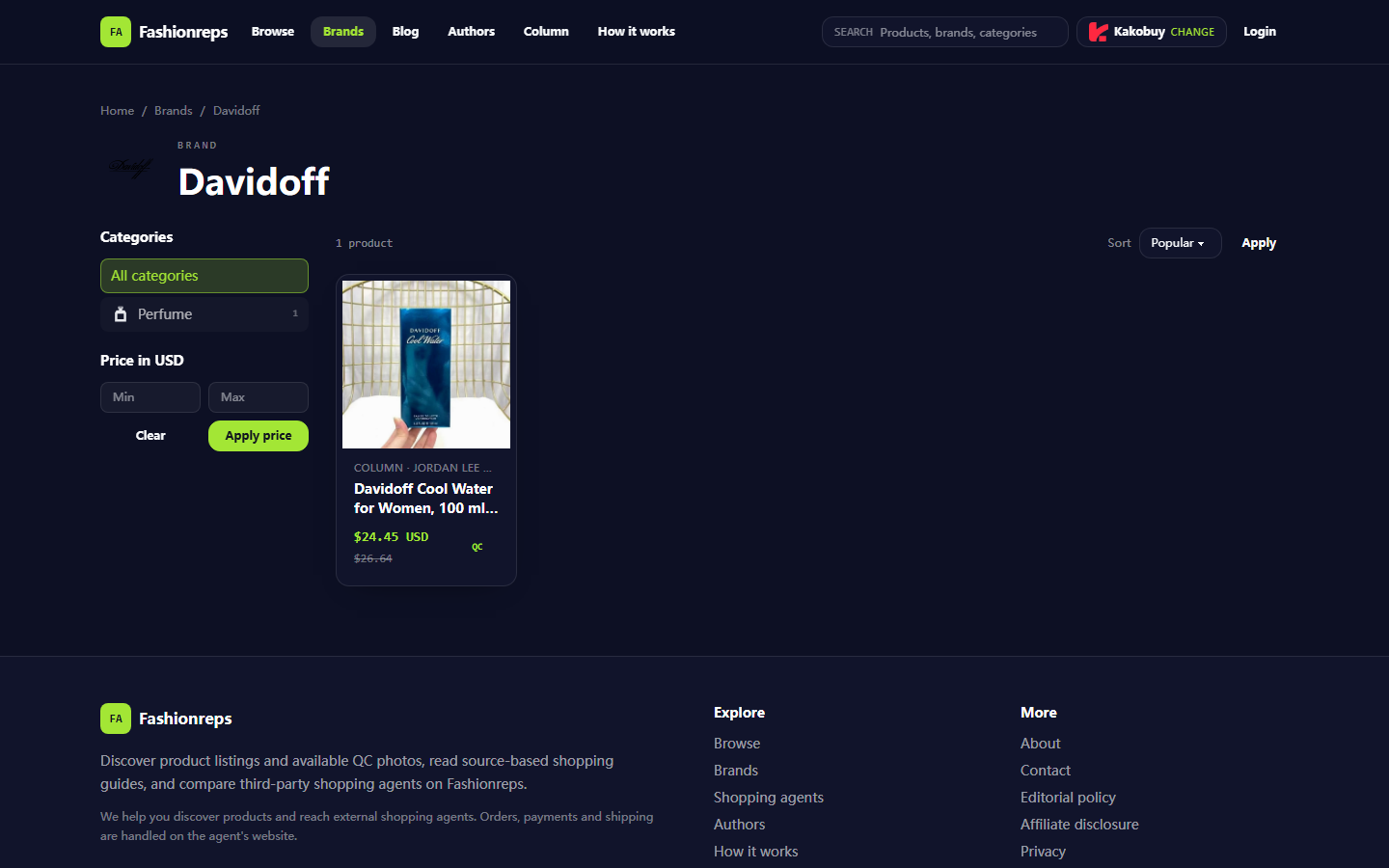
The page record shows a Davidoff brand page with a fragrance category and a listing for Davidoff Cool Water for Women, 100 ml. This record only shows the catalog content at that moment; it does not prove inventory, availability, or that the checkout page will remain the same. Don't treat the reference price or catalog screenshot as the final payment price. 📝
When saving screenshots, try to include the product name, option area, and address bar at the same time. If you need to share screenshots, cover your account, order number, shipping address, phone, payment info, and personal data, but don't cover fields used to identify the variant.
Compare Fragrance, Size, Quantity, and Product Image Field by Field
Start from the product page and create a simple verification record. Change only one action at a time—avoid switching fragrance, quantity, and agent simultaneously, which can make it impossible to tell where the discrepancy came from.
| Verification Field | What to Record on Product Page | Key Differences to Watch |
|---|---|---|
| Fragrance | Full option text or style name | Name replaced, abbreviated, or defaulted |
| Size | ml value and unit | 100 ml becomes 50 ml, or size field disappears |
| Quantity | Quantity selected on product page | Cart quantity resets or duplicates |
| Image | Product image for current option | Image still shows original variant, text shows another |
| Price | Price for current option | Price doesn't update after variant change |
If the product page shows only one catalog item, but later pages show multiple fragrance options, don't assume all options are available. First confirm whether these options are actual product variants, recommended products, or default content in page components.
Also check whether the option text comes from the same product. For example, if the product name says women's, but the image shows a different line, or a fragrance and size combination never appeared on the product page, don't treat that combination as a valid product just because the page auto-generated it.
Check Whether Options Still Match the Original Variant After Adding to Cart
After confirming product page fields, perform a single add-to-cart action. Screenshot the product page before adding, and open the cart immediately after, without switching to other products first.
In the cart, verify:
- Product title matches product page.
- Fragrance and size still shown in full.
- Quantity matches earlier selection.
- Thumbnail matches selection on product page.
- Unit price and subtotal show no unexplained changes.
- Product link, product code, or variant ID still traceable.
If the cart shows only a generic name, e.g., just Davidoff, with no fragrance or size, mark it as insufficient information rather than assuming it matches the product page option. Before proceeding to checkout, confirm whether the cart offers expandable details, edit options, or a link back to the original product page.
If duplicate items appear in the cart, first check for repeated clicks, page load delays, or browser back-button actions. Don't "fix" quantity by clicking add-to-cart again. Instead, exit the current action and reload the cart to see if one record already exists.
Compare Cart, Checkout, and Order Confirmation Field Differences
On the checkout page, focus not on design but on confirming product fields before submission. Checkout may also show shipping country, shopping agent, shipping fees, or other charges; don't mix those with product variant info.
Recommended comparison order:
- Product name consistent.
- Fragrance or style consistent.
- Size consistent.
- Quantity consistent.
- Image or variant ID consistent.
- Unit price, subtotal, and total match selected variant.
- Whether agent, region, or shipping method changed after entering checkout.
If checkout changes only currency symbols or fee items, but variant fields stay the same, this is more likely a checkout display difference; if fragrance, size, or quantity also changes, don't treat it as just a price issue.
Save a checkout screenshot before paying. Don't submit an order to test whether the system will auto-correct, because submission may create a real order, payment authorization, or subsequent purchase task. 💳
Distinguish Between Page Refresh, Option Not Provided, and Product Mapping Inconsistency
When a discrepancy appears, you can try to classify it, but don't make a definite conclusion without evidence.
Page refresh or cache display differences typically show:
- Options return to normal after refresh.
- Same page shows consistent fields when reopened.
- Cart and checkout still keep the same product code.
- Only format, language, or currency display changes; core variant unchanged.
Option not provided typically shows:
- Product page clearly shows a fragrance, but current region, inventory, or agent page cannot continue selection.
- Option grayed out, out of stock, or prompts to reselect.
- Checkout asks to reconfirm product instead of showing another fragrance.
Product mapping inconsistency has higher risk, common signals include:
- Fragrance name differs between product page and checkout.
- Size and image change simultaneously.
- Product code or link points to different product.
- Checkout shows a combination not offered on product page.
- Cart title, image, and option text contradict each other.
These signals alone don't prove a technical fault, but they show the order information hasn't been reliably verified. Stop submission, keep difference records, and seek official confirmation. ⚠️
Avoid Duplicate Orders, Duplicate Payment, or Continuing Submission When Differences Appear
When fields don't match, first avoid the following actions:
- Repeatedly clicking add-to-cart.
- Opening multiple pages and paying separately.
- Manually editing the title to substitute for real variant confirmation.
- Paying first, then asking the platform to change the fragrance.
- Ignoring fragrance, size, or quantity differences because of a lower price.
- Submitting multiple identical orders to test the system.
Safer to pause the current flow and record the last page state that was consistently confirmed. If suspected duplicate entries already in cart, don't create another order; first check for unfinished orders, payment authorizations, or agent-side purchase records.
If you already paid, don't pay again to "override" the first transaction. Save payment time, order status, and page fields, and contact the official support channel that actually collected payment or processes the order. fashion-reps.net's product discovery page and external shopping agents may have different responsibilities for orders, payments, and shipping; when asking for help, clarify whether you need to confirm product variant mapping or order processing status.
Organize Screenshots, Product Links, and Field Differences Before Submitting Official Help Request
Before submitting a help request, prepare a short, reviewable description. Don't just write "wrong fragrance"; write clearly at which step the difference occurred.
Suggested to include:
- Product page URL.
- Full product name, fragrance, and size shown on product page.
- Screenshots before and after adding to cart.
- Cart and checkout screenshots.
- Time and action sequence for each screenshot.
- Quantity you selected and shipping country or region.
- Whether you switched shopping agent, account, or browser.
- Whether you have submitted order or paid.
- The single question you want official confirmation on, e.g., "Does the fragrance in checkout still match the selected variant on the product page?"
If the issue occurs on fashion-reps.net product info, link redirect, or product page display, use that site's public official contact channels; if the difference appears in the shopping agent's cart, payment, or purchase page, also contact the agent that actually handles the order. Don't send account passwords, full payment card numbers, passports, complete shipping labels, or other sensitive data to public comment sections.
During the help request, don't keep modifying options in the same cart. Each modification increases the chance of mixed evidence and may change inventory or price status.
Decide Whether to Continue Verification, Replace Candidate, or Hold Purchase Based on Support Reply
After receiving a reply, first see if they clearly answered the variant mapping, not just generic statements like "you can buy" or "please reorder".
Conditions to continue verification:
- They explicitly confirm fragrance, size, and quantity correspondence.
- They provide product code or variant ID that matches your page records.
- After reopening the page, product page, cart, and checkout fields are consistent.
- Price, inventory, and shipping conditions rechecked for current time.
Situations to consider replacing candidate product:
- Original target fragrance is truly unavailable.
- Official cannot confirm page option mapping.
- Product image, name, and size have long contradicted.
- Agent asks to use another product link without explaining the correspondence.
Situations to hold purchase:
- Still cannot confirm which fragrance will be purchased.
- Checkout persistently shows different size or quantity from product page.
- Support reply did not resolve variant mapping issue.
- Page requires payment first, then later confirms actual product.
- You cannot save enough page records to prove selection.
Before restarting, clean or confirm old cart state, and use a new, separate verification record to reduce risks of duplicate items, duplicate payment, and incorrect purchase. ✅
Verification Conclusion
When Davidoff product page and checkout show fragrance option differences, the safest order is: save product page and time, then check fragrance, size, quantity, and image field by field; then check cart and checkout product fields, and finally contact the relevant official support channel based on where the difference occurs.
If you cannot confirm the exact variant that will be purchased, don't continue submitting. The cost of holding is waiting or choosing a different candidate, but it avoids the risk of refund and after-sales hassle from receiving the wrong fragrance, wrong size, or duplicate orders.
Article Image