Editor score 4.2 / 5
Clarify the Broken Planet Hoodie QC Photo Verification Task
If you're about to check a Broken Planet hoodie, the first thing to figure out isn't "does it look authentic?" but rather confirm that the QC photos actually correspond to the style, color, and size you selected. This article tackles one specific issue: how to enter the relevant QC photo area from the Fashionreps product detail page and determine whether the existing photos are sufficient to support your next step.
After reading, you should be able to do three things: find the QC entry for the corresponding style, record missing or insufficient photo evidence, and pause and submit a clear request for additional photos to Fashionreps' official support channel when evidence is insufficient. This article does not apply if you've already left the product detail page, can't confirm the style, or need to determine brand authenticity, material composition, or final shipping costs. 🧭

Confirm Style, Color, and Size from the Fashionreps Product Detail Page
First, go back to the corresponding Broken Planet hoodie product detail page. Don't start judging based on search results or photos from other styles. The page provides an entry to the QC photo area and also reminds users to first confirm the style name, then look at the photos.
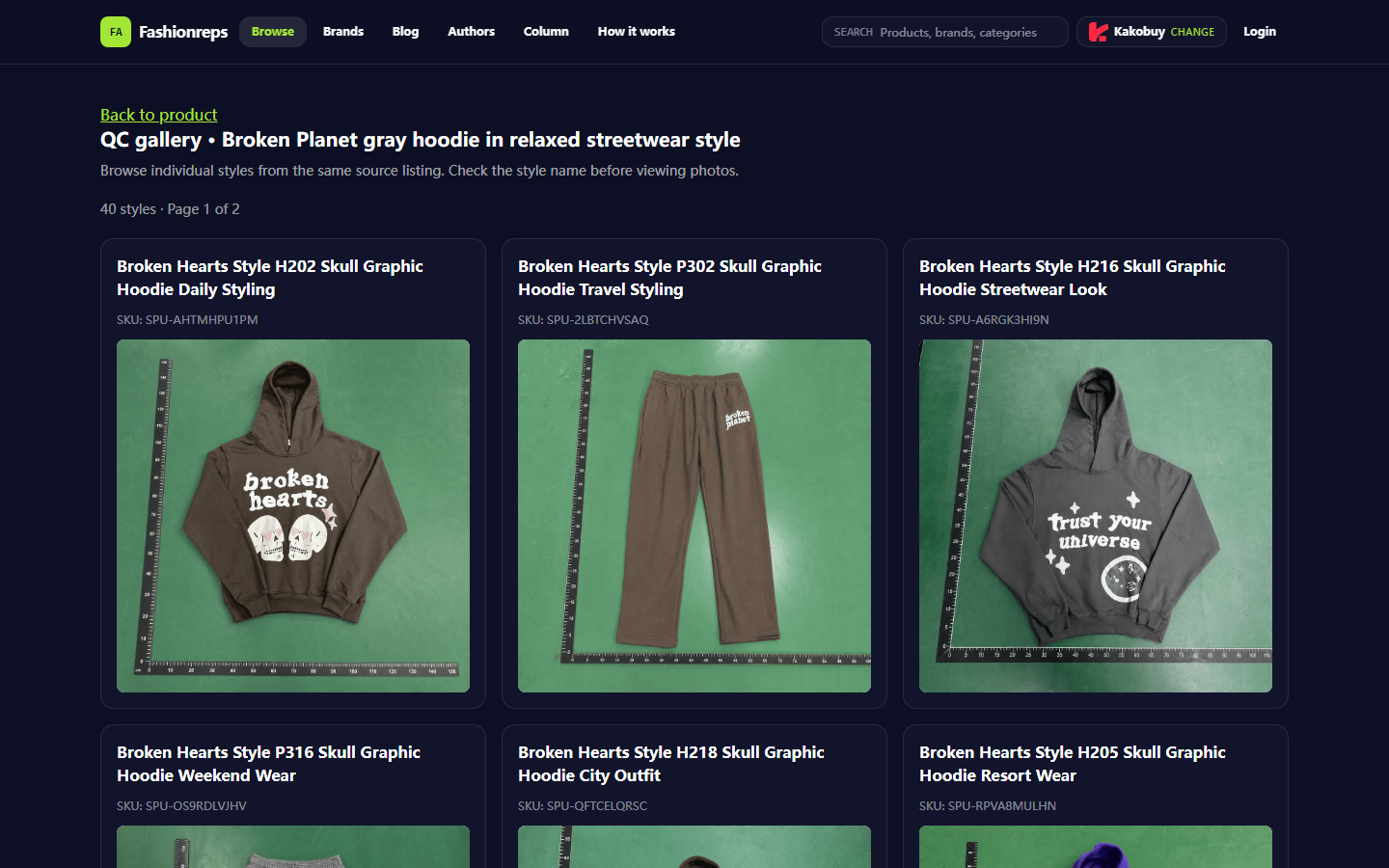
This step is especially important because items from the same source may correspond to multiple styles. The currently visible QC page shows that this source has 40 styles, displayed across multiple pages. The style names and SKUs shown on the page do not necessarily match the color or size you actually selected, so you need to check item by item:
- Whether the style name matches the option in your order or cart
- Whether the color name corresponds to the version you plan to buy
- Whether you've recorded the size; don't guess based on photo proportions
- Whether the SKU on the page is consistent with the current product listing
- Whether the photos belong to the current style, not other styles from the same source
If you can't confirm these details, stop judging the photos. When the style identity is uncertain, even clear photos cannot serve as QC evidence for your current order.
Enter the Relevant QC Photo Area via the Product Page Entry
On the product detail page, prioritize using the QC photos or QC gallery entry provided on the page. After entering, check the product name and style information displayed on the page. Don't treat photos from other pages, search engine thumbnails, or social media images as QC records for the current item.
Fashionreps is designed to help users discover and view product information and connect to external shopping agents. Orders, payment, and shipping are handled by the agent website you choose. Therefore, the QC photo entry on Fashionreps is mainly for viewing available evidence; it does not mean the order is complete, nor does it mean the agent has confirmed stock or accepted your request for additional photos. 💡
After entering the QC area, it's recommended to check in a fixed order:
- First, look at the page title and style name.
- Then confirm that the photos belong to the current product listing.
- Record visible details: front, back, cuffs, drawstrings, prints, and labels.
- Mark areas that cannot be determined; don't fill in gaps with photos from adjacent styles.
- Finally, check for duplicate photos, failed image loads, or clearly missing key angles.
Record Missing Photos, Insufficient Angles, and Clarity Issues
The value of QC photos lies in providing verifiable visual evidence, not in automatically drawing purchase conclusions for you. It's recommended to categorize issues into three types.
Missing photos: The page does not show the parts you need to confirm, such as no back view, no label photo, or no close-up of the print.
Insufficient angles: There are photos, but the shooting angle cannot determine key details, such as only seeing the front and not the back pattern; or only seeing the overall item and not being able to observe cuffs, collar, and stitching.
Insufficient clarity: The photos have loaded, but resolution, glare, obstruction, or cropping makes text and details illegible.
When recording, don't write judgments like "quality must be bad" or "definitely not authentic" that go beyond the photo evidence. More accurate wording would be "current photos cannot confirm cuff stitching" or "label text cannot be read due to insufficient clarity." This separates facts, pending evidence, and editorial judgment, and helps support staff understand your request. 🔍
Distinguish Visible Evidence, Pending Evidence, and Editorial Judgment
Visible evidence is what you can actually observe in the photos, such as seeing the front design of the hoodie from a certain angle, or the label area appearing in the frame.
Pending evidence is what the current page does not provide but would affect your decision, such as missing size tag, washing label, back view, cuff details, or overall flat lay. Pending evidence does not mean the item is defective; it just means verification cannot be completed at this stage.
Editorial judgment should be kept within clear boundaries. This article can only explain the verification path based on the page's visible information; it cannot replace physical inspection, nor can it confirm brand authenticity, fabric feel, actual weight, stock status, or final shipping outcome based on photos.
Submit a Specific Photo Request via Official Support Channels
If the page evidence is insufficient, submit a request through the official support or Contact channel provided on the Fashionreps page. The request should focus on the current item and specific gaps, avoiding generic descriptions like "please send more photos" that cannot be acted upon.
It's recommended to specify in one go:
- Product name and current style name
- Parts that need additional photos
- Shooting angles needed, such as front, back, side, label, or cuffs
- Specific issues to resolve, such as confirming print placement or reading the size tag
- Limitations of current photos, such as blur, glare, or obstruction
Do not publicly share order numbers, payment card information, passport, full shipping address, or full shipping labels. If you need to submit screenshots, mask personal information first, keeping only the areas necessary for support staff to judge the item and photo issues. 🛡️
After submitting, keep a record of your request content and page status. Don't treat "waiting for reply" as "evidence has been supplemented" just because you submitted a photo request. Once new photos arrive, re-verify the style, color, size, and photo correspondence.
Conditions for Pausing When Evidence Is Insufficient
Pause further ordering or subsequent steps if any of the following occurs:
- Cannot confirm the specific style the QC photos correspond to
- Color or size does not match your current selection
- Key parts have no photos at all
- Photo clarity is insufficient to judge the details you care about
- The page shows other styles or items from other sources
- The judgment you need depends on physical touch, precise measurements, or brand authentication
- The photo request has not yielded verifiable results
Pausing does not mean judging the item as poor quality; it means the existing evidence is insufficient to support the next decision. For actions that may involve payment, agent orders, or international shipping costs, it's usually safer to fill in key evidence first than to deal with wrong styles later. ⚠️
Action Checklist After Completing Verification
After completing verification, organize your records in the following order:
- Save the product name, style name, color, and size
- Confirm you entered the relevant QC photo area from the current product page
- Record what each photo proves and what it does not prove
- List missing angles, blurry parts, and pending evidence separately
- Submit a specific request via official support or Contact channel
- Once additional photos arrive, re-verify the correspondence between photos and style
- Pause if evidence is still insufficient; don't substitute photos from adjacent styles
- Only proceed to consult external shopping agents about ordering, payment, and shipping arrangements if you can accept the remaining uncertainty
The core conclusion of this verification is simple: the QC photo entry only helps you view visible evidence related to the current style; it cannot automatically replace style confirmation, photo communication, or purchase decisions. Separately record "what you saw" and "what you still don't know" to avoid rushing ahead due to photo mismatches or evidence gaps.
Common Questions About Shopping on Agent Platforms
1. What product categories can I browse on yupoo.tips?
yupoo.tips carries a wide selection of merchandise: shoes, T-shirts, sweaters, hoodies, jeans, sweatpants, shorts, beach shorts, items from factory clearance, down jackets, baseball jerseys, shirts, hats, jewelry, bags, electronics, sunglasses, socks, underwear, and popular collectibles.